2. Problem#
2.1. What is the Problem#
Problem is the foundational interface for UQPyL. It integrates all elements needed to define and solve an analysis or optimization problem.
A problem instance includes:
Decision Variables: Information about the decision dimension, variable names, ranges, and types.
Problem Function: Python functions that map decision variables to output values, including objectives and/or constraints.
2.2. Overview of Problem class#
The UQPyL.problems module provides a Problem class as a container for
all essential information required to define a problem instance.
Here is the API reference of the Problem class.
2.3. Class Problem#
The Problem class is designed to define optimization problems.
It extends the abstract base class ProblemABC and allows users to specify
custom objective and constraint functions.
Constructor
__init__(nInput, nOutput, ub, lb, objFunc, conFunc, evaluate,
         conWgt, varType, varSet, optType, xLabels, yLabels, name)
Parameters
nInput (int): Number of input variables
nOutput (int): Number of output variables
ub (int, float, list, ndarray): Upper bounds
lb (int, float, list, ndarray): Lower bounds
objFunc (callable): User objective function
conFunc (callable): User constraint function
evaluate (callable): User evaluation function
conWgt (list): Constraint weights
varType (list): Variable types (0: continuous, 1: int, 2: discrete)
varSet (dict): Discrete variable sets
optType (str/list): Optimization type (‘min’ or ‘max’)
xLabels (list): Input variable labels
yLabels (list): Objective labels
name (str): Problem name
Methods
2.3.1. objFunc#
Compute objective values for a batch of samples.
Parameters
X(2D ndarray): Input samples
Returns
2D ndarray: Objective values
2.3.2. conFunc#
Compute constraint values.
Parameters
X(2D ndarray): Input samples
Returns
2D ndarray: Constraint values
2.3.3. evaluate#
Calculate both objective and constraints.
Returns
dict:
{'objs': ndarray, 'cons': ndarray}
2.4. How to define a problem#
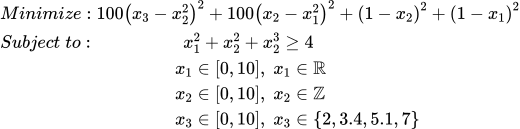
Below is a modified Rosenbrock function with constraints:
Compared to the original Rosenbrock:
It adds a constraint: \(x_1^2 + x_2^2 + x_3^2 ≥ 4\)
It changes variable types: -
x1: continuous -x2: integer -x3: discrete
Example code:
from UQPyL.problems import Problem

# Objective function (vectorized)
def objFunc(X):
    objs = (100 * (X[:, 2] - X[:, 1]**2)**2
            + 100 * (X[:, 1] - X[:, 0]**2)**2
            + (1 - X[:, 1])**2
            + (1 - X[:, 0])**2)
    return objs[:, None]


# Single-run version using decorator
from UQPyL.problems import singleFunc

@singleFunc
def objFunc_(X):
    obj = (100 * (X[2] - X[1]**2)**2
           + 100 * (X[1] - X[0]**2)**2
           + (1 - X[1])**2
           + (1 - X[0])**2)
    return obj

# Constraint function (vectorized)
def conFunc(X):
    cons = X[:, 0]**2 + X[:, 1]**2 + X[:, 2]**2 - 4
    return cons[:, None]

# Variable settings
nInput = 3
nOutput = 1
ub = [10, 10, 10]
lb = [0, 0, 0]
varType = [0, 1, 2]
varSet = {2: [2, 3.4, 5.1, 7]}
optType = 'min'
xLabels = ['x1', 'x2', 'x3']
yLabels = ['obj1']
name = 'Rosenbrock'

# Build problem instance
problem = Problem(
    nInput=nInput,
    nOutput=nOutput,
    objFunc=objFunc,
    conFunc=conFunc,
    ub=ub,
    lb=lb,
    varType=varType,
    varSet=varSet,
    optType=optType,
    xLabels=xLabels,
    yLabels=yLabels,
    name=name
)

# Optimization example using GA
from UQPyL.optimization.single_objective import GA

ga = GA()
ga.run(problem=problem)
2.5. Using evaluate to replace objFunc and conFunc#
Some practical problems may not be convenient to separate into objFunc and
conFunc. In such cases, UQPyL recommends defining everything inside the
evaluate function.
Example:
def evaluate(X):
    # Compute objective
    objs = (100 * (X[:, 2] - X[:, 1]**2)**2
            + 100 * (X[:, 1] - X[:, 0]**2)**2
            + (1 - X[:, 1])**2
            + (1 - X[:, 0])**2)

    # Compute constraint
    cons = X[:, 0]**2 + X[:, 1]**2 + X[:, 2]**2 - 4

    # Return dictionary
    return {'objs': objs[:, None], 'cons': cons[:, None]}
Single-run mode (using @singleEval):
from UQPyL.problems import singleEval

@singleEval
def evaluate(x):
    obj = (100 * (x[2] - x[1]**2)**2
           + 100 * (x[1] - x[0]**2)**2
           + (1 - x[1])**2
           + (1 - x[0])**2)
    con = x[0]**2 + x[1]**2 + x[2]**2 - 4

    return {'objs': obj, 'cons': con}
Remaining setup is the same:
nInput = 3
nOutput = 1
ub = [10, 10, 10]
lb = [0, 0, 0]

varType = [0, 1, 2]
varSet = {2: [2, 3.4, 5.1, 7]}
optType = 'min'

xLabels = ['x1', 'x2', 'x3']
yLabels = ['obj1']
name = 'Rosenbrock'

problem = Problem(
    nInput=nInput,
    nOutput=nOutput,
    evaluate=evaluate,
    ub=ub,
    lb=lb,
    varType=varType,
    varSet=varSet,
    optType=optType,
    xLabels=xLabels,
    yLabels=yLabels,
    name=name
)
Note
Problem.evaluate returns a Python dictionary with two keys:
'objs' and 'cons'. Access them as:
res['objs'], res['cons']
2.6. Benchmark Problems#
Optimization problems in real applications often lack known solutions. Benchmark problems provide standardized evaluation targets with known behavior.
UQPyL includes a wide set of benchmark problems.
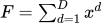
2.7. Single-objective Benchmarks#
Name |
Formula |
Optimal Solution |
Optima |
|---|---|---|---|
Sphere |
 |
(0, 0, 0 … 0) |
0.0 |
Schwefel_2_22 |
 |
(0, 0, 0 … 0) |
0.0 |
Schwefel_1_22 |
 |
(0, 0, 0 … 0) |
0.0 |
Schwefel_2_21 |
 |
(0, 0, 0 … 0) |
0.0 |
Schwefel_2_26 |
 |
(420.9687 … 420.9687) |
-12569.5 |
Rosenbrock |
 |
(0, 0, 0 … 0) |
0.0 |
Step |
 |
(1, 1, 1 … 1) |
0.0 |
Quartic |
 |
(1, 1, 1 … 1) |
0.0 |
Rastrigin |
 |
(0, 0, 0 … 0) |
0.0 |
Ackley |
 |
(0, 0, 0 … 0) |
0.0 |
Griewank |
 |
(0, 0, 0 … 0) |
0.0 |
Bent_Cigar |
 |
(0, 0, 0 … 0) |
0.0 |
Discus |
 |
(0, 0, 0 … 0) |
0.0 |
Weierstrass |
 |
(0, 0, 0 … 0) |
0.0 |
2.8. Multi-objective Benchmarks#
Name |
Objectives |
Pareto Front |
Feature |
|---|---|---|---|
ZDT1 |
2 |
Line |
Convex |
ZDT2 |
2 |
Line |
Concave |
ZDT3 |
2 |
Line |
Disconnected |
ZDT4 |
2 |
Line |
Convex |
ZDT6 |
2 |
Line |
Concave |
DTLZ1 |
>=3 |
Surface |
Multimodal |
DTLZ2 |
>=3 |
Surface |
Single-peaked |
DTLZ3 |
>=3 |
Surface |
Multimodal |
DTLZ4 |
>=3 |
Surface |
Multimodal |
DTLZ5 |
>=3 |
Line |
Multimodal |
DTLZ6 |
>=3 |
Line |
Multimodal |
DTLZ7 |
>=3 |
Discrete Surface |
Multimodal |
All benchmark problems are available under:
UQPyL.problems.single_objectiveUQPyL.problems.multi_objective
Example:
from UQPyL.problems.single_objective import Sphere

problem = Sphere(nInput=20, ub=10, lb=-10)