Getting Started#
🎉 Introduction#
UQPyL is a Python package for Uncertainty Quantification and Optimization of computational models and their associated problems (e.g., model calibration, resource scheduling, product design). It includes a wide range of methods and algorithms for Design of Experiments, Sensitivity Analysis, Optimization (Single- and Multi-objective). Additionally, Surrogate Models are built-in for solving computationally expensive problems.
✨ Main Features#
Comprehensive Sensitivity Analysis and Optimization: Implements widely used sensitivity analysis methods and optimization algorithms.
Running Display and Result Save: Enable users to track and save the history and results of their running.
Advanced Surrogate Modeling: Integrate various surrogate models and an auto-tunning tool to enhance these model performances.
Rich Application Resources: Provides a suite of benchmark problems and practical case studies, enabling users to get started quickly. (👉 Recent Planing: For water science research, we plan to customize the interface to integrate water-related models with UQPyL, enhancing usability and functionality, like SWAT-UQ. So, if you have interest, please contact us to collaborate.).
Modular and Extensible Architecture: Encourages and facilitates the development of novel methods or algorithms by users, aligning with our commitment to openness and collaboration. (We appreciate and welcome contributions)
⚙️ Installation#


Recommended (PyPi or Conda):
pip install -U UQPyL
conda install UQPyL --upgrade
Alternatively:
git clone https://github.com/smasky/UQPyL.git
cd UQPyL
pip install .
🍊 Define Problem#
To effectively use UQPyL, the key is to define the solved problem, including:
The basic information of the problem, e.g., the dimension, range, type (float, int, or discrete) of each variable, the name of the problem, decisions, objectives, constraints.
The objective function that describe how the output
objis obtained from the inputsx, referred to asobjFuncin UQPyL. TheobjFunccan be a mathematical formula, computational model with pre- and post-processing, or external black-box process.If required, the constraint function should be implemented, referred to as
conFunc, which contains one or more constraints that the inputsxmust satisfy.
Take the variant of the Rosenbrock function as example:
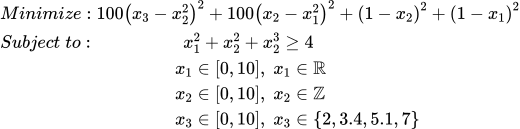
Compared to original Rosenbrock, this problem involve extra constraint
functions ( \(x_1^2 + x_2^2 + x_3^2 \ge 4\) ) and changes the variable
types, from the origin continuous and float to int ( \(x_2\) )
and discrete ( \(x_3\) ).
Now, we use this problem to specifically introducing:
📘 View Jupyter Notebook example online
# For simplifying the process of defining problem, UQPyL provide a `Problem` class

# Step 1: Import `Problem` class from the `problems` module of UQPyL
from UQPyL.problems import Problem

# Step 2: Defining the `objFunc` function
# The `objFunc` function takes a 2-dimensional(2D) NumPy array `X` as input and
# returns a 2D NumPy array `objs` as output.
#
# Input:
#   X = [ [1, 2, 3],   # Each row represents a decision (or solution)
#         [4, 5, 6],   # Each column represents a specific variable
#         [7, 8, 9] ]
#
# Output:
#   objs = [ [1],      # Each row represents the objective value(s)
#            [2],                     corresponding to a decision in `X`
#            [3] ]
#
# Note:
#   - If there are N decisions and M objectives, the shape of `objs` should be (N, M)
#   - Users must ensure that `objs` is a 2D NumPy array

def objFunc(X):
    # If possible, advise vectorizing operations on matrix X
    # to improve computational efficiency.

    objs =100 * (X[:, 2] - X[:, 1]**2)**2+ 100 * (X[:, 1] - X[:, 0]**2)**2  + \
            (1 - X[:, 1])**2 + (1 - X[:, 0])**2

    return objs[:, None] # Ensure the returned `objs` is a 2D numpy array.


# Alternative Usage:
#
# When using computational models where vectorized operations on the input `X` are not feasible,
# UQPyL provides a convenient alternative: the `@singleFunc` decorator.
#
# This decorator enables "single-run" mode, where `objFunc` accepts
# a single input at a time. The input should be a Python list or 1D NumPy array.
#
# `objFunc` would returns a scalar value (int or float) for single-objective problems,
# or a list / 1D NumPy array for multi-objective problems.

# First, import the decorator from UQPyL.problems
from UQPyL.problems import singleFunc

@singleFunc
def objFunc_(X):

    # Perform calculations for each element in X

    obj = 100 * (X[2] - X[1]**2)**2 + 100 * (X[1] - X[0]**2)**2 + \
            (1 - X[1])**2 + (1 - X[0])**2

    return obj


# Step 3: Define `conFunc` function
# Similar to `objFunc`, `conFunc` also supports two modes.
#
# Note:
#   The return of `conFunc` require whether the constraints are satisfied:
#       - A negative value indicates a violation of the constraint — the smaller the
#         value, the more severe the violation.
#       - A positive value indicates the constraint is satisfied, i.e., the solution
#         is feasible.
# Therefore, users need to reformulate their original constraint expressions
# to follow this convention.

# Array Mode
def conFunc(X):

    cons = 4 - X[:, 0]**2 + X[:, 1]**2 + X[:, 2]**2

    return cons[:, None] #keep 2D numpy array

# Single-run Mode
@singleFunc
def conFunc(X):

    con = 4 - X[0]**2 + X[1]**2 + X[2]**2

    return con # scaler value is feasible

# Step 4: Describe the properties of X

nInput = 3 # number of input variables, here it's 3 inputs.
nOutput = 1 # number of outputs, here it's 1 objective.

# Upper bound of X.
# It can be a float, int, list, or numpy array.
ub = [10, 10, 10]
# In this case, both input variables have an upper bound of 10.
# Optional way:
ub_ = 10

# Lower bound of X.
lb = [0, 0, 0]
lb_ = 0

# Type of variables.
# Where `0` for continuous, `1` for integer, and `2` for discrete.
varType = [0, 1, 2]
# corresponding to float, integer, discrete

# For discrete variables, users should indicate the set of possible values
varSet = {2: [2, 3.4, 5.1, 7]}
# Here, following Python zero-based indexing, `2` refers to the third variable.
# This means that x3 can only take one of these four values: 2, 3.4, 5.1, or 7.

# Optimization type:
# Where 'min' for minimization, 'max' for maximization.
optType = 'min'
# Note:
# For multi-objective problems, users can specify the optimization direction
# (e.g., `min` or `max`)
# for each objective individually using a list,
# or define a global direction that applies to all objectives.

# Labels of each input variables.
xLabels = ['x1', 'x2', 'x3']
# If the optimization problem includes named variables, you can define them here.
# Otherwise, default names such as 'x1', 'x2', 'x3', etc., will be automatically generated.


# Labels of each objective.
yLabels = ['obj1']
# Similar to `xLabel`, if your objective(s) have specific names, you can define them here.
# Otherwise, default labels such as 'obj1', 'obj2', etc., will be used.

# Name of the optimization problem
name = 'Rosenbrock'
# Useful for identifying the problem instance, managing results, saving files, etc.

#Step 5: Initialize the problem instance
problem = Problem(
    nInput = nInput,
    nOutput = nOutput,
    objFunc = objFunc,
    conFunc = conFunc,
    ub = ub,
    lb = lb,
    varType = varType,
    varSet = varSet,
    xLabels = xLabels,
    yLabels = yLabels,
    name = name
)

# Step 6: Optimization
# All methods and algorithms of UQPyL run by reading the `problem` objective
# Use the Genetic Algorithm (GA) as example
from UQPyL.optimization.single_objective import GA

# Create an instance of GA.
# By default, GA would output optimizing history
# and final results in the command line.
# please check tutorial for specific usage.
ga = GA()

# Run `ga` by input `problem` object
ga.run(problem = problem)

# Output:
# Time:  0.0 day | 0.0 hour | 0.0 minute |  1.17 second
# Used FEs:    50000  |  Iters:  999
# Best Objs and Best Decision with the FEs
# +-------------------+-------------------+-------------------+-------------------+
# |        FEs        |       Iters       |      OptType      |      Feasible     |
# +-------------------+-------------------+-------------------+-------------------+
# |         50        |         0         |        min        |        True       |
# +-------------------+-------------------+-------------------+-------------------+
# +-------------------+-------------------+-------------------+-------------------+
# |        obj1       |         x1        |         x2        |         x3        |
# +-------------------+-------------------+-------------------+-------------------+
# |      4.0e+02      |       0.000       |       0.000       |       2.000       |
# +-------------------+-------------------+-------------------+-------------------+
🍇 Benchmark Problems#
UQPyL provides some built-in benchmark problems (inheriting from Problem
class) to test algorithms.
# Import single-objective problems from UQPyL.problems.single_objective
from UQPyL.problems.single_objective import Sphere, Ackley

# Import multi-objective problems from UQPyL.problems.multi_objective
from UQPyL.problems.multi_objective import ZDT1, DTLZ1

# Users can easily customize the input dimension and variable bounds as needed

# Single-objective benchmark problems
# Sphere function with 10 dimensions, bounds of all variables is [-100, 100]
problem1 = Sphere(nInput=10, ub=100, lb=-100)

# Ackley function with 15 dimensions, bounds of all variables is [-100, 100]
problem2 = Ackley(nInput=15, ub=np.ones(10)*100, lb=np.ones(10)*-100)  #

# Multi-objective benchmark problems
# ZDT1 problem with 5 decision variables, bounds use default.
problem3 = ZDT1(nInput=5)

# DTLZ1 problem with 15 decision variables, bounds use default.
problem4 = DTLZ1(nInput=15)
🍎 Sensitivity Analysis#
Take Ishigami Function as example.
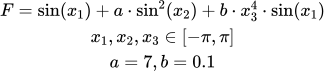
The theoretical sensitivity indices of the Ishigami function are as follows:
First-order sensitivity indices: x1 = 0.314, x2 = 0.442, x3 = 0.000
Total-order sensitivity indices: x1 = 0.558, x2 = 0.442, x3 = 0.244
📘 View Jupyter Notebook example online
import numpy as np

from UQPyL.problems import Problem

# Define Ishigami problem
def objFunc(X):
    objs = np.sin(X[:, 0]) + 7 * np.sin(X[:, 1])**2 + \
                 0.1 * X[:, 2]**4 * np.sin(X[:, 0])
    return objs[:, None]

Ishigami = Problem(nInput = 3, nOutput = 1, objFunc = objFunc,
                    ub = np.pi, lb = -1*np.pi, varType = [0, 0, 0],
                    name = "Ishigami")

# Import sensibility analysis methods from UQPyL.sensibility
from UQPyL.sensibility import Sobol

# Create a instance of `Sobol`
sobol = Sobol()

# Sampling sample
# N = 512 defines the base sample size;
X = sobol.sample(problem = Ishigami, N = 512)

# Evaluate the objective of sample points
Obj = problem.objFunc(X)

# Perform Sobol' sensitivity analysis
# Inputs:
#   - problem: the problem instance (defines bounds and function)
#   - X: the input samples
#   - Obj: the objective of X
sobol.analyze(problem, X, Obj)

# By default, the following results will be obtained:
# =======================Attribute=======================
# First Order Sensitivity: True
# Second Order Sensitivity: False
# Total Order Sensitivity: True
# ======================Conclusion=============================
# --------------------------S1---------------------------------
# +-------------------+-------------------+-------------------+
# |        x_1        |        x_2        |        x_3        |
# +-------------------+-------------------+-------------------+
# |       0.3222      |       0.4531      |       0.0175      |
# +-------------------+-------------------+-------------------+
# --------------------------ST---------------------------------
# +-------------------+-------------------+-------------------+
# |        x_1        |        x_2        |        x_3        |
# +-------------------+-------------------+-------------------+
# |       0.5436      |       0.4306      |       0.2416      |
# +-------------------+-------------------+-------------------+
🍒 Optimization#
Here’s an example using SCE-UA to optimize the Sphere function.
📘 View Jupyter Notebook example online
# Import Sphere
from UQPyL.problems.single_objective import Sphere

# Create an instance of Sphere
sphere = Sphere(nInput = 10)

# Import SCE-UA from UQPyL.optimization.single_objective
from UQPyL.optimization.single_objective import SCE_UA

# Create an instance of Sphere
sce = SCE_UA()

# Run
res = sce.run(sphere)
# Return object `res` is a python dict, which containing optimization history and the best results

# Extract the best decision variables and objective values
bestDecs = res.bestDecs
bestObjs = res.bestObjs

# The program would display the optimization history in the command line
# =========Conclusion=================================
# Time:  0.0 day | 0.0 hour | 0.0 minute |  5.32 second
# Used FEs:    24356  |  Iters:  1000
# Best Objs and Best Decision with the FEs
# +-------------+-------------+-------------+--------------+-------------+
# |     FEs     |    Iters    |   OptType   |   Feasible   |     y_1     |
# +-------------+-------------+-------------+--------------+-------------+
# |    24122    |     990     |     min     |     True     |   4.6e-12   |
# +-------------+-------------+--------------+-------------+-------------+
# +-------------+-------------+--------------+-------------+-------------+
# |     x_1     |     x_2     |     x_3      |     x_4     |     x_5     |
# +-------------+-------------+--------------+-------------+-------------+
# |    -0.000   |    -0.000   |    0.000     |    0.000    |    -0.000   |
# +-------------+-------------+--------------+-------------+-------------+
# +-------------+-------------+--------------+-------------+-------------+
# |     x_6     |     x_7     |      x_8     |     x_9     |     x_10    |
# +-------------+-------------+--------------+-------------+-------------+
# |    -0.000   |    -0.000   |    0.000     |    -0.000   |    -0.000   |
# +-------------+-------------+--------------+-------------+-------------+
🍓 Surrogate Modeling#
Use RBF model to predict Sphere Function as an example.
📘 View Jupyter Notebook example online
# Generating training data
from UQPyL.problems import Sphere
sphere = Sphere(nInput = 10)

# Import Latin Hypercube Sampling (LHS) for generating design of experiments
from UQPyL.DoE import LHS

# Generate 200 training samples in the input space using LHS
lhs = LHS()
xTrain = lhs.sample(200, problem.nInput, problem = sphere)

# Evaluate the true objective of training points
yTrain = sphere.objFunc(xTrain)

# Generate 50 test samples for model validation
xTest = lhs.sample(50, problem.nInput, problem = sphere)
# Evaluate the true objective of test points
yTest = sphere.objFunc(xTest)

# Import Radial Basis Function (RBF) surrogate model
from UQPyL.surrogate.rbf import RBF

# Create an instance of RBF
rbf = RBF()
# fit the model
rbf.fit(xTrain, yTrain)

# Use the trained RBF model to predict outputs of test inputs
yPred = rbf.predict(xTest)

# Import R² to evaluate surrogate model performance
from UQPyL.utility.metric import r_square

# Compute R² score between true and predicted test outputs
r2 = r_square(yTest, yPred)
print(r2)
Note
For advanced usage, please check tutorial page.